Video overview · Made for readers
Turn articles into narrated videos.
Start with the article and its pictures. Get the key ideas in a narrated video, with captions and visuals drawn from the source.
01In: the article + its visuals
02Out: video19s
Real input. Real output from the same article. No trial use to watch. Export in 9:16 / 4:5 / 1:1 / 16:9.
Sign-in required · 3 total per account · No daily or monthly reset
Different articles. Different ways to explain.
Real outputs from the CastReader overview pipeline, using original demonstration articles. English narration, captions and full transcripts. Playing these examples never uses your trial allowance.
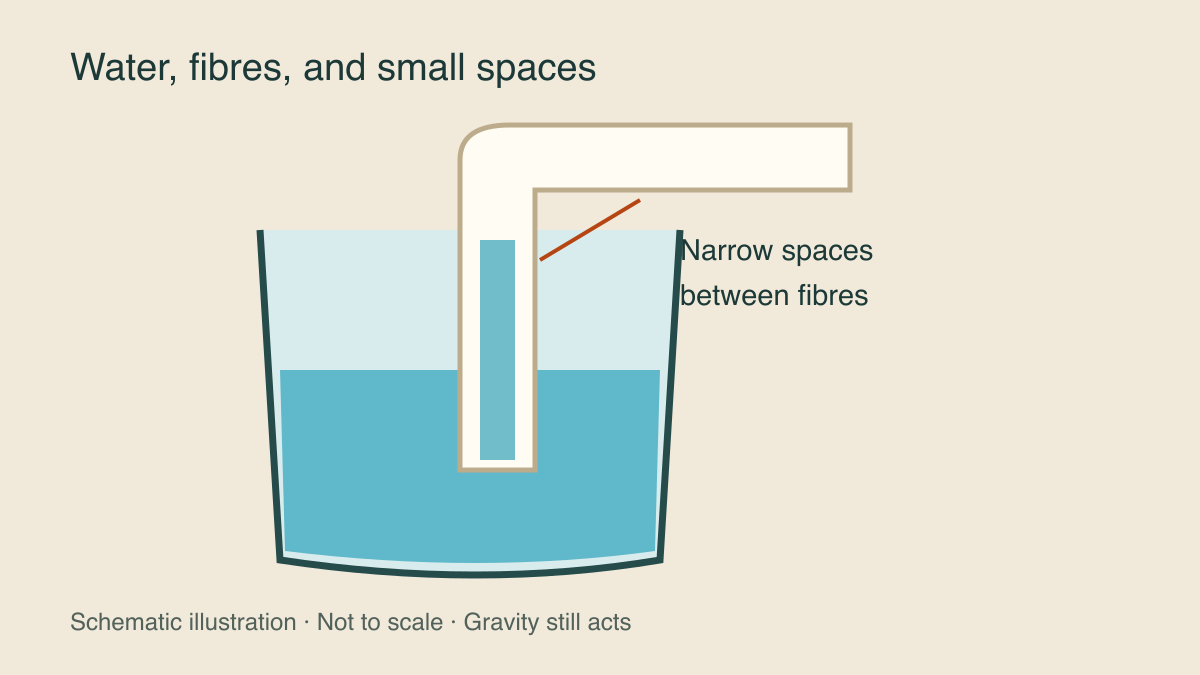
Why water climbs a paper towel
A science explanation using its original schematic, with the limits of the demonstration kept in the narration.
Read the source articleRead the exact narration
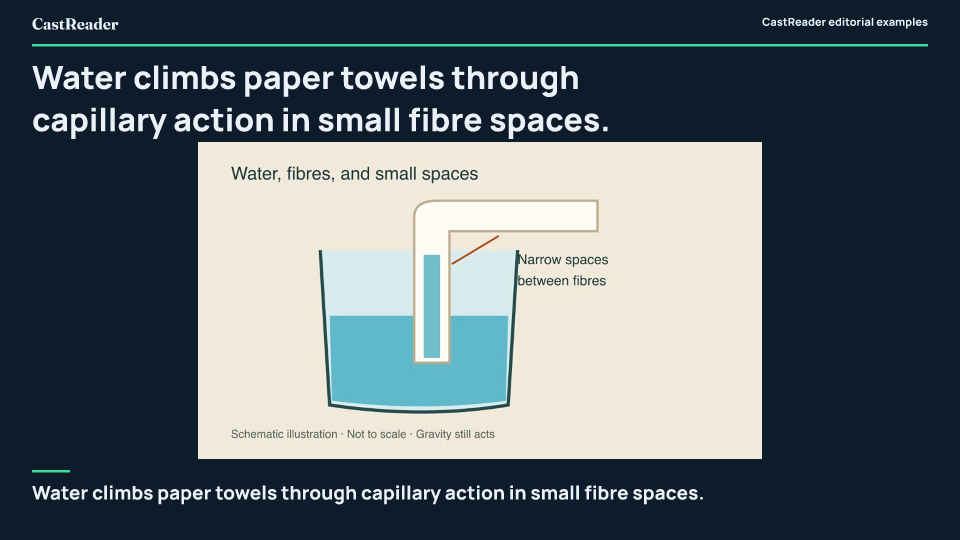
Water climbs paper towels through capillary action in small fibre spaces. Molecular adhesion and cohesion pull water upward. Liquid molecules adhere to fibres, while cohesion binds molecules together across narrow gaps. Gravity limits rise, making real height dependent on paper conditions. Because gravity counteracts tension, demonstrations illustrate the general mechanism rather than precise numerical predictions.
Twelve articles, three purposes
An invented reading log shows how counts, denominators and a chart stay connected. These are illustrative data, not research.
Read the source articleRead the exact narration
Demonstration data divides twelve articles across three reading purposes. Half of the sample represents quick overviews. The log allocates 6 of 12 articles to overviews, 4 of 12 articles to careful reading, and 2 of 12 articles to reference checking. The numbers demonstrate formatting, not reader study findings. These invented counts describe reading purposes rather than quality ratings or recommendations. Sound summaries keep denominators with their definitions. Any comparison must be rechecked if labels or populations shift, leaving the original text as the ultimate check.
Question, retell, check
An article without images becomes a text-led overview. The editorial advice includes no promise of faster learning.
Read the source articleRead the exact narration
Anchor difficult reading with one question to give the session purpose. Retell the core idea and note uncertain gaps. After reading, close the text to explain the main idea, and note gaps instead of guessing uncertain links. Return to verify numbers and unresolved points. Check the original passage to keep specific figures and conditions intact, leaving notes unresolved if the article leaves them open. This editorial workflow structures reading without guaranteed speed gains. The sequence of questioning, retelling, and checking serves as an editorial organization tip rather than a tested learning guarantee.
Start with an article. Keep its meaning.
- 01
Open a supported article
Use an available desktop extension, open the article body and choose Generate overview. Sign in when prompted.
- 02
Watch the story take shape
The article title stays visible while it is prepared. Play, pause, seek and replay when content is ready. Timing varies by source and service load.
- 03
Save or share when you choose
Once generation finishes, choose a format and prepare the file. You do not have to watch to the end. Opening sharing options does not start encoding.
The source stays part of the story.
The overview uses relevant images that the client can read from the article. It can give a photograph room, keep a chart’s context, or explain an idea without a picture. It does not fill empty space with unrelated stock images.
Choose the kind of understanding you need.
Hear the source text, in order.
Unpack difficult passages. Its Overview depth is a separate setting.
Follow the key ideas as a narrated visual summary.
One overview. Four ways to frame it.
Choose a local MP4 format. Layouts adapt to the format; the article summary stays the same. Downloading or changing format does not use another generation.
Download is the general sharing path. TikTok, Instagram, X and YouTube direct publishing depends on rollout, a connected account and publishing-service conditions. Pro generation does not include every third-party publishing capability. You confirm the video and caption before an available direct-publishing action.
Where you can use it today
Feature availability is separate from whether a CastReader app can be downloaded. This release is verified on the international service. A China-region video workflow has not been accepted; do not switch account regions to work around availability.
| Client | Feature version | Availability |
|---|---|---|
| Firefox | 1.2.72 | Available · desktop Firefox 140+ |
| Chrome | 1.2.72 | Version in store review |
| Edge | 1.2.72 | Version in store review |
| iOS / Android | — | Video overview not released |
| Mac / Windows / Safari | — | Video overview not released |
Availability checked November 17, 2026. Chrome currently lists 1.2.71; the 1.2.72 review and Edge review are separate from public availability.
Supported article pages only. Books, Kindle, EPUB, book readers, arbitrary PDFs, email and AI chats are not implied by their Read Aloud support. No paywall or DRM bypass.
Official Firefox add-onA small free start. Room to keep exploring.
Free
3 successful new overviews per account, total
Sign in first. No daily or monthly reset. A failed server generation releases its reservation; closing the window does not necessarily cancel the job.
Pro
No generation-count limit
Abuse, concurrency and cost safeguards apply. A busy service is a reason to retry later, not to purchase Pro again.
Video uses a separate counter from reading, Explain, translation and personal voices. It is also separate from the 3-day subscription trial.
See full pricingLocal pictures and export. Connected generation.
- On your device
- Article image pixels are read and rendered locally. Your MP4 is encoded after you explicitly prepare it.
- Through services
- Article text, material descriptions and necessary narration data are processed to create and check the overview. Account, task and cache records may be retained.
- Only when you publish
- An explicit direct-publishing action sends the video to the publishing provider and destination platform. Third-party retention follows its own rules.
Questions before your first overview
What is a video overview?
It turns the key ideas in a supported article into a short narrated overview with captions, relevant source images and appropriate character presentation. It is a reading aid, not a replacement for the source.
How does it differ from Read Aloud and Read & Explain?
Read Aloud speaks the source text. Read & Explain helps unpack difficult passages. A video overview organizes key ideas into a standalone visual summary you can watch and export. The Overview depth in Read & Explain is a separate setting.
Do I need an account?
You need a CastReader account and must sign in to generate video overviews. This does not change anonymous on-device reading where that workflow is available.
How many free overviews do I get? Does the allowance reset?
Each registered account currently gets 3 successfully generated new overviews in total. This does not reset daily or monthly. Switching browsers, reinstalling or clearing a cache does not reset the same account’s allowance.
Which browsers and devices support it?
Check the feature availability table on this page. You need a client version that includes video overviews; an app or extension being available to download does not by itself mean it includes this feature. Native iOS and Android support will be listed after implementation and verification.
Can I use it with Kindle or ebooks?
Not at present. Video overviews are disabled for book platforms and book-reading modes. Their existing reading and explanation features are unaffected.
Will it use the article’s images?
Relevant images can be used when your device can read them. They stay connected to the article, with the context needed for charts or artworks. Decorative, advertising or unrelated images should not be included.
Must I watch to the end before sharing?
No. Sharing and downloading become available once generation is complete and the required content is ready. You do not need to finish watching.
Which export formats are available?
Local MP4 export currently supports 9:16, 4:5, 1:1 and 16:9. Each destination shows the formats supported by its current publishing flow. Changing the format does not rewrite the article summary.
Are my images and article uploaded?
The current article workflow reads and processes image pixels on your device. Article text and necessary material descriptions are processed by services to create and check the narrative and narration. This is not a fully offline feature or a promise that no related data is retained.
Open an article with a question in mind.
Use an overview to find your bearings. Return to the source for the details that matter.
See supported browsers