Official mobile stores
Install CastReader from the App Store on iPhone or from Google Play on Android, then keep the same reading habit on the phone you actually carry.
Kindle read aloud app for iPhone and Android
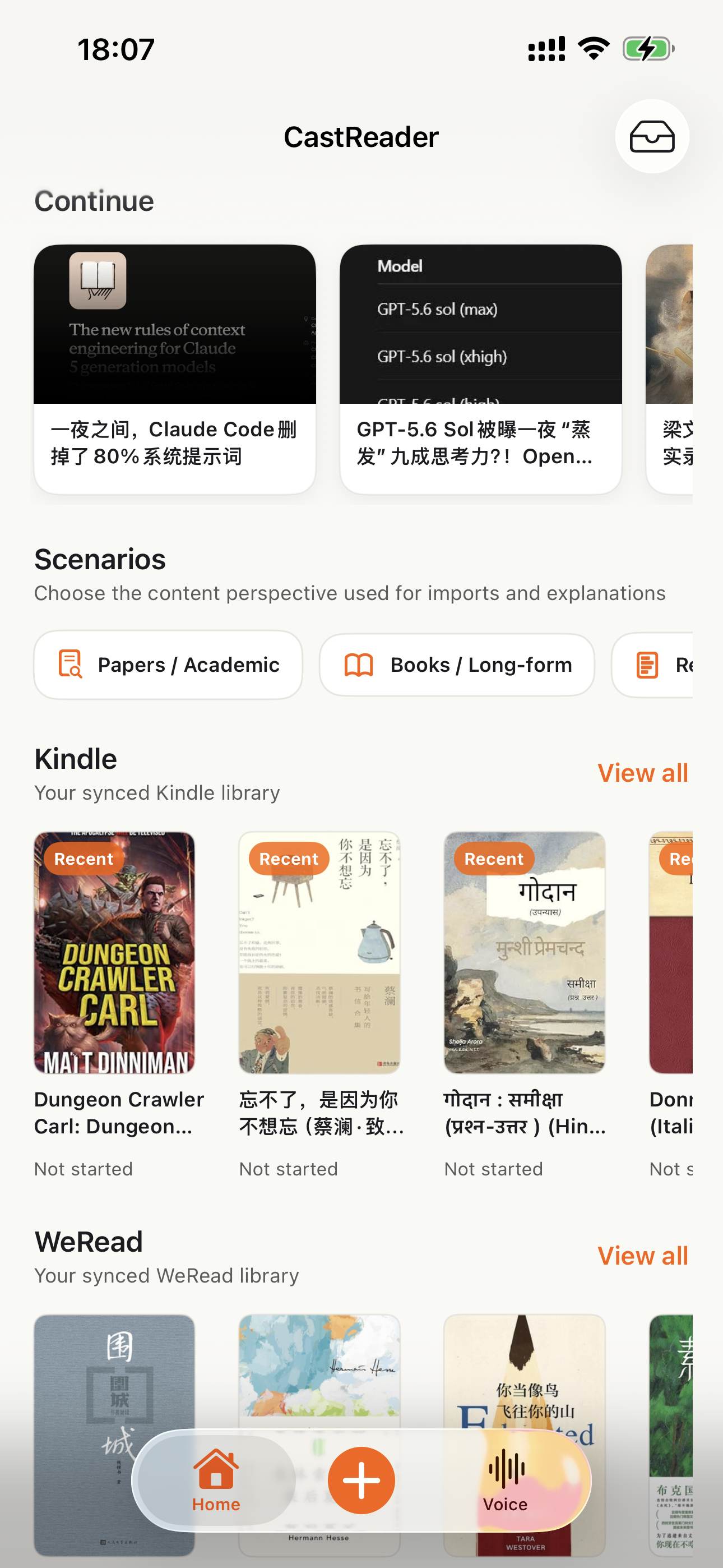
CastReader turns your Kindle library into a mobile read-aloud experience: open your bookshelf, tap a book, press Read Aloud, and listen with synced highlighting, auto-scroll, resume progress, background or lock-screen playback, plus AI explanations when the text gets hard.
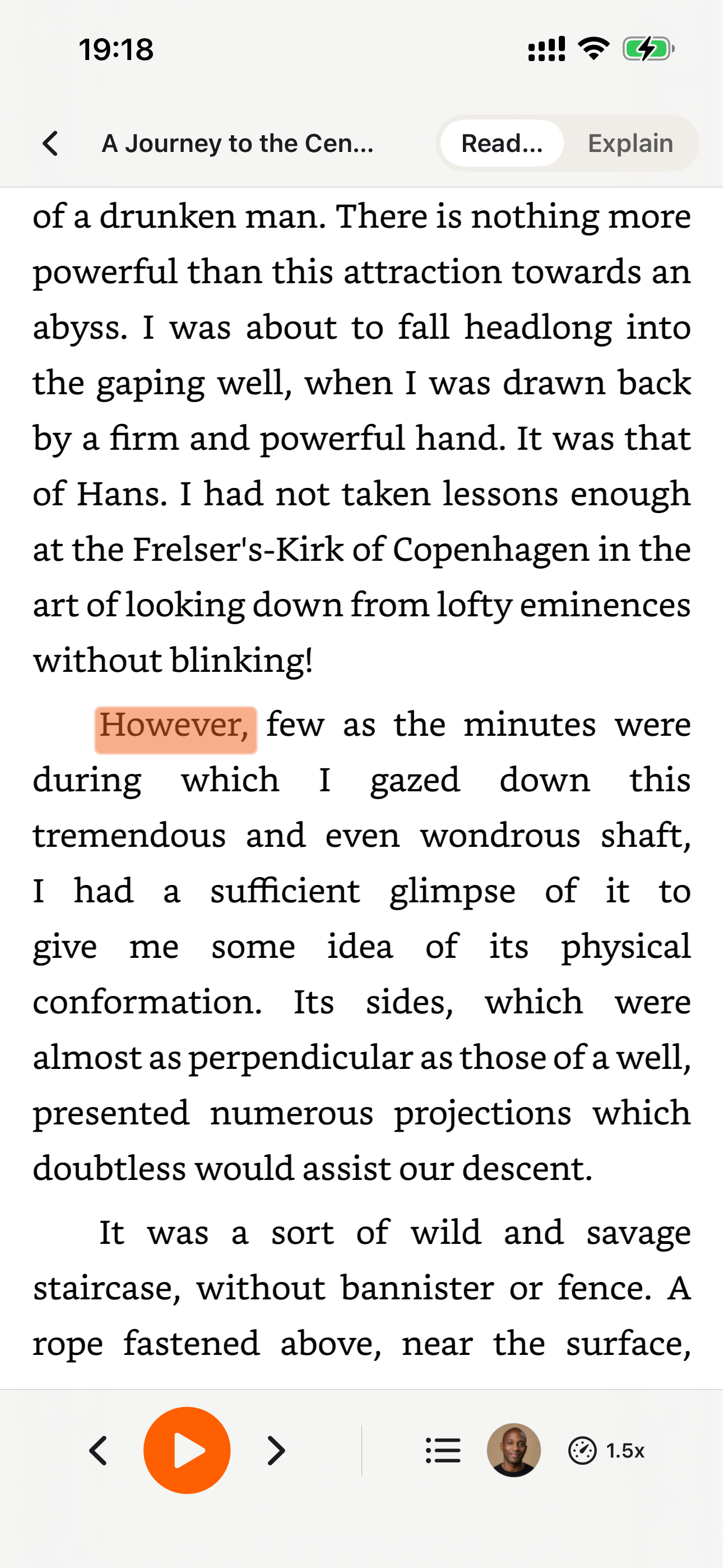
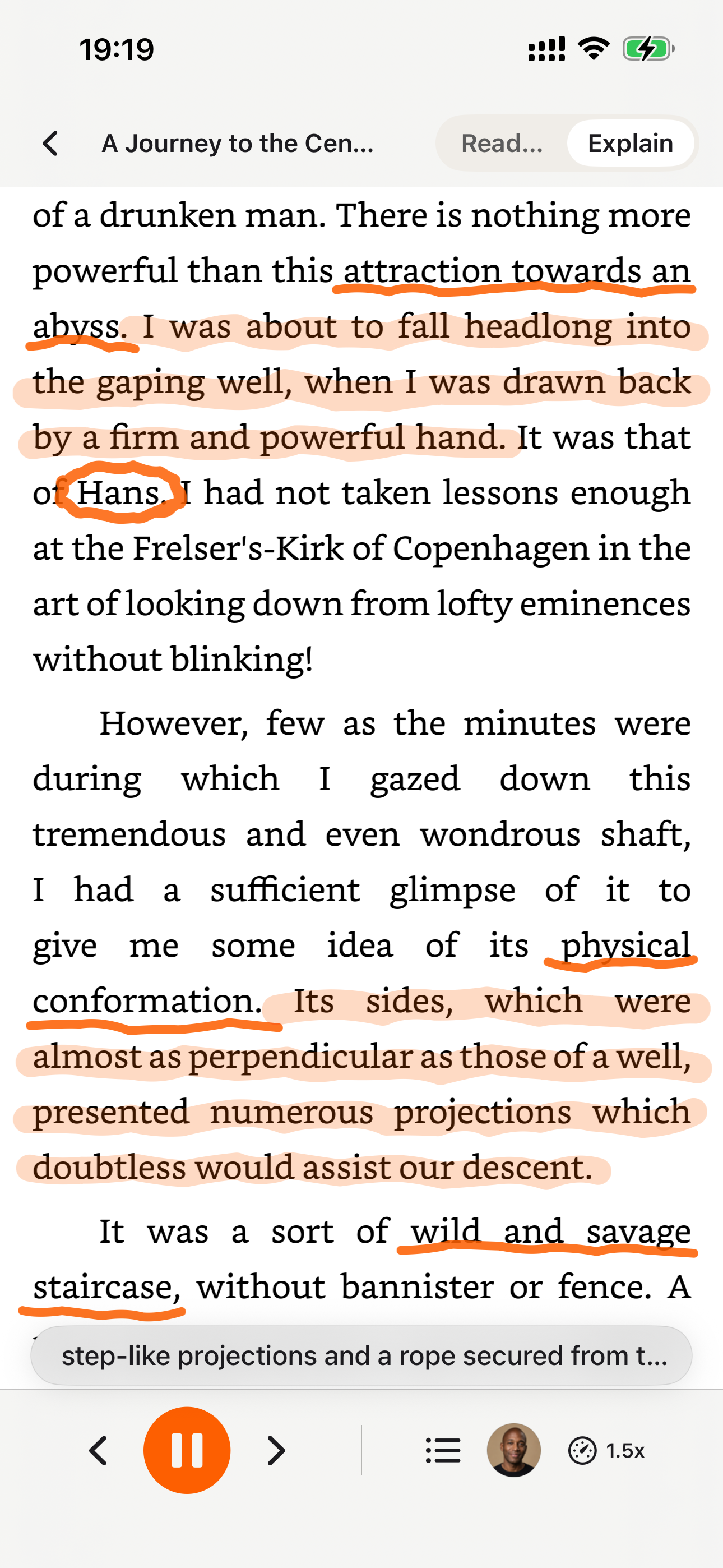
Real mobile app demo: bookshelf to book detail to Read Aloud with TTS, highlighting, auto-scroll, and mobile playback controls.
22s
real phone demo
App Store + Google Play
iPhone and Android
3 depths
overview, standard, deep
6 scenarios
books, papers, study, work
Android app now on Google Play
CastReader is no longer a browser-only workaround. The mobile app now supports smoother Kindle Read Aloud and Explain sessions with page preloading, better highlights, and native phone playback controls.
Install CastReader from the App Store on iPhone or from Google Play on Android, then keep the same reading habit on the phone you actually carry.
Recent Android updates focus on smoother page turns, preloading, replay, multilingual text, and better highlights during Kindle-style listening.
When a chapter gets dense, switch from read aloud into AI explanation for books, papers, reports, contracts, study notes, and technical material.
A mobile-first flow for listening to books you already keep in your Kindle-style reading library.
Bring your Kindle reading flow into CastReader so your bookshelf becomes a listening queue.
CastReader organizes books and reading items for mobile playback, progress, and later resume.
Pick the title you want from the shelf and keep the original reading context visible.
Start natural TTS with controls for speed, voice, and progress.
Follow synced highlights, auto-scroll through the book, and continue from the lock screen.
The page is not just converted into audio. It stays readable, trackable, and easy to resume.
Use CastReader on iPhone or Android when you want Kindle books to behave like a personal audiobook queue.
Words and passages stay visually connected to the voice so you can read along, skim back, or refocus quickly.
The reading view moves with the audio instead of forcing you to keep nudging the page by hand.
Keep listening while the phone is locked or while you move between apps during a commute or walk.
Return to the same book and continue from where the listening session left off.
Switch from read aloud to guided explanation when a chapter, argument, term, or character relationship needs unpacking.
AI Explain, not just TTS
Plain text-to-speech pronounces the words. CastReader keeps the original text visible and helps you understand dense, foreign, technical, or literary passages as you listen.
Keep the book, PDF, or article in view while CastReader calls out the key idea instead of moving you into a detached audio file.
Use Overview, Standard, or Deep explanation depth for characters, arguments, formulas, terms, and difficult paragraphs.
Stay in read-aloud mode for easy sections, then ask for an explanation only when the text slows you down.
Kindle is the main doorway. The same mobile read-aloud and explanation system also handles documents, papers, and serious reading workflows.
Listen to abstracts, methods, findings, and citations while asking CastReader to explain dense passages.
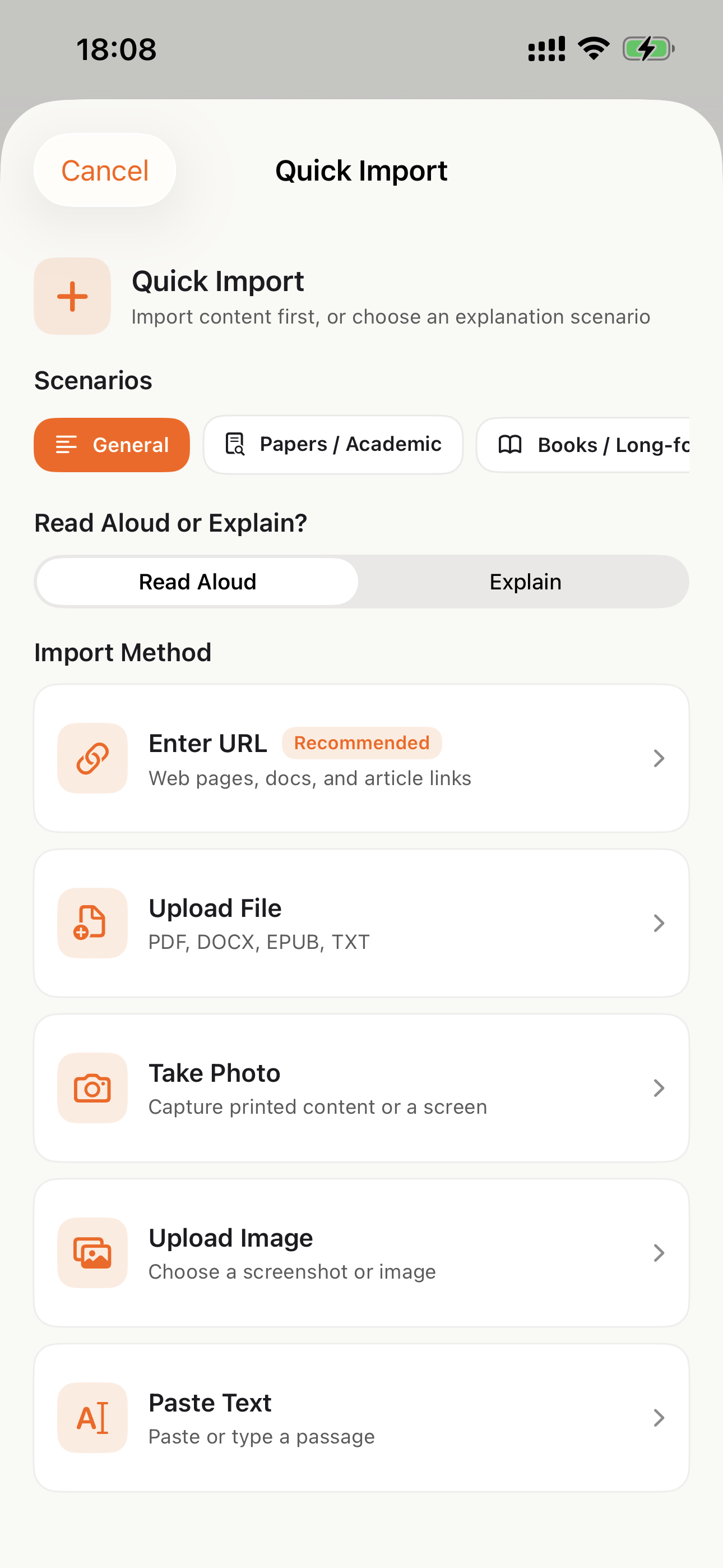
Inputs: URL, PDF, DOCX, EPUB, image, text
Depths: Overview for skim, Standard for section-level understanding, Deep for methods and claims
Explore this reading workflowTurn novels, nonfiction, and saved long reads into sessions you can read, listen to, and resume.
Inputs: URL, PDF, DOCX, EPUB, image, text
Depths: Overview summary, Standard chapter explanation, Deep themes and character analysis
Explore this reading workflowListen through reports, memos, market notes, and strategy docs while preserving the document structure.
Inputs: URL, PDF, DOCX, EPUB, image, text
Depths: Overview for decisions, Standard for key points, Deep for risks and assumptions
Explore this reading workflowUse audio plus explanation to slow down around obligations, exceptions, definitions, and risky clauses.
Inputs: URL, PDF, DOCX, EPUB, image, text
Depths: Overview for parties and terms, Standard for clause meaning, Deep for issue spotting
Explore this reading workflowConvert readings into review sessions with listening, highlights, and explanation depth that matches your study goal.
Inputs: URL, PDF, DOCX, EPUB, image, text
Depths: Overview flash review, Standard concept pass, Deep step-by-step explanation
Explore this reading workflowListen to docs, specs, and manuals while preserving headings, instructions, and technical terms.
Inputs: URL, PDF, DOCX, EPUB, image, text
Depths: Overview map, Standard procedure explanation, Deep troubleshooting walkthrough
Explore this reading workflowThe demo starts in the CastReader mobile app with a bookshelf. A reader opens a book from the library instead of searching for a separate audiobook edition.
The book detail screen leads into a Read Aloud action. CastReader starts TTS on the phone, keeps the original reading context visible, and highlights text as the voice reads.
During playback, the page advances with auto-scroll so the active passage stays in view. The experience is designed for long sessions where you may switch between reading and listening.
When you leave the app or lock the phone, playback can continue in the background. CastReader remembers progress so you can resume the book later without hunting for the paragraph again.
Yes. CastReader is designed for phone listening, including iPhone. Open your Kindle reading flow in CastReader, choose a book, tap Read Aloud, and listen with synced highlighting, auto-scroll, background playback, and resume progress.
Yes. Download CastReader for Android on Google Play to use Kindle read aloud, synced highlighting, background playback, and AI explanations on Android.
Yes. Download CastReader for Android on Google Play, open your reading flow, and use Read Aloud with highlighting, auto-scroll, background playback, and AI explanations.
Kindle read-aloud support varies by device, app, language, and book. CastReader provides a mobile read-aloud layer focused on listening to books from your library with highlighting and progress controls.
CastReader is built around your existing reading library workflow. The goal is to let books you already keep in your Kindle shelf become listenable on your phone without starting from a separate audiobook catalog.
No. CastReader is not affiliated with Amazon or Kindle. Amazon and Kindle are trademarks of Amazon.com, Inc. or its affiliates.
Yes. The mobile experience is designed for background and lock-screen listening so you can continue during commutes, walks, chores, or study breaks.
Yes. CastReader keeps audio and text synchronized with visible highlighting and auto-scroll so you can follow the original reading position.
Yes. CastReader supports Overview, Standard, and Deep explanation modes for books, papers, reports, contracts, study materials, manuals, and technical docs.
No. Audible is professionally produced audiobook content. CastReader is for listening to reading material you already have, while keeping the original text, highlights, scrolling, and explanation tools available.
Fix cases where Kindle Cloud Reader is not reading aloud.
Read EPUB books aloud with mobile-friendly listening.
Turn PDFs into structured audio sessions.
Listen, summarize, and explain long documents.
Study with TTS, highlighting, and explanation.
Hear AI responses aloud with inline controls.
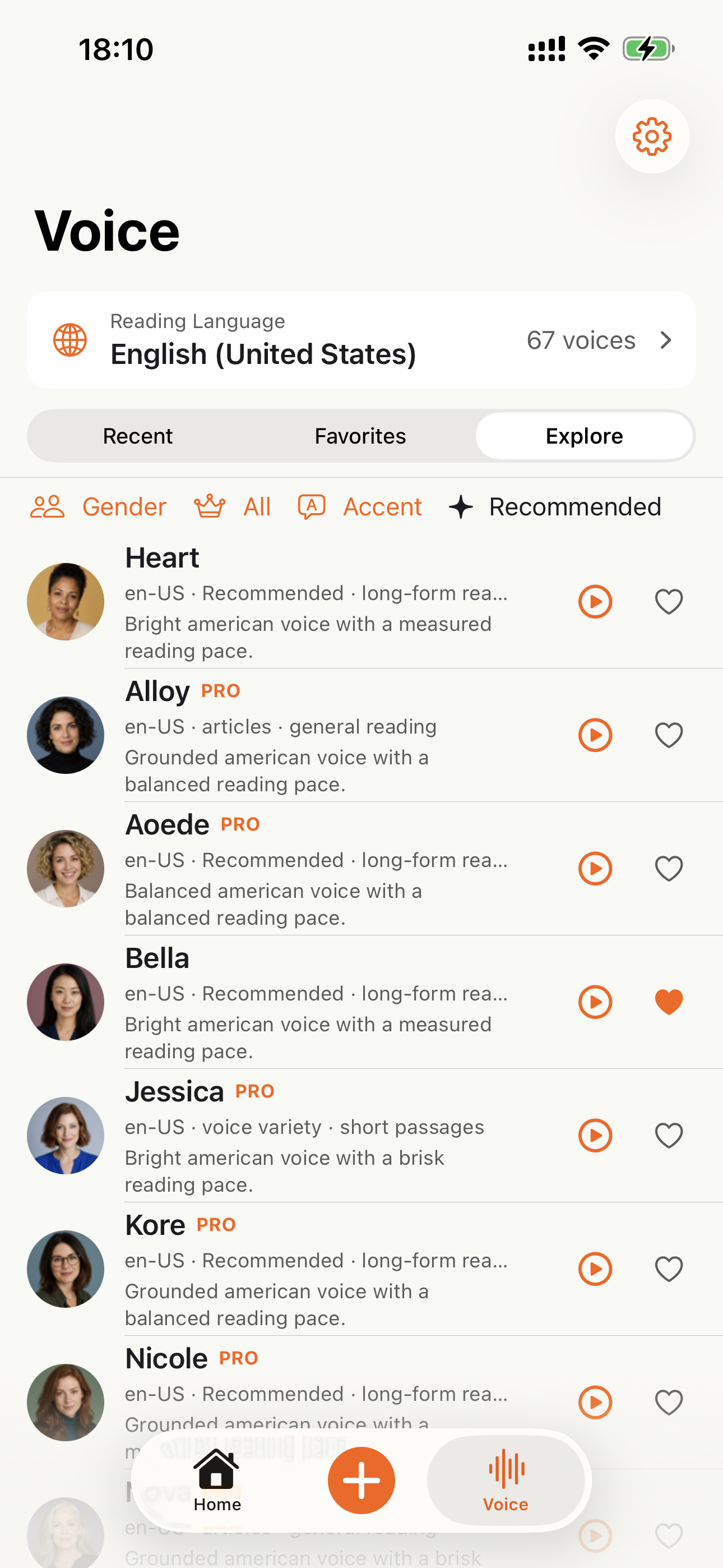
Preview the real English and Mandarin reading voices before choosing one in the app.
Download CastReader, open your Kindle reading queue, and turn long books into mobile listening sessions with highlights, AI explanations, and resume progress.
CastReader is not affiliated with Amazon or Kindle. Amazon and Kindle are trademarks of Amazon.com, Inc. or its affiliates.
The question behind almost every search that lands here is narrower than it looks. It is not "can my phone read books aloud" — it is "I already bought this book on Kindle, why can I not just listen to it." That gap is real, and it is worth understanding before installing anything.
Amazon does sell narration, but separately. Audible audiobooks are their own purchase, recorded by a human narrator, and a Kindle ebook does not include one. For titles that offer Whispersync for Voice you can add the narration at a reduced price after buying the ebook — reduced, not free, and only for the subset of books where a recording exists. A backlist title or a technical manual usually has no audio edition at all.
Older Kindle hardware did have built-in text-to-speech; the Kindle 2, DX and Keyboard could read a book aloud in a synthetic voice. That feature did not carry forward to the modern lineup, which is why people who remember it go looking for where it went.
What the Kindle apps offer today on iPhone and Android is accessibility support: VoiceOver on iOS, TalkBack on Android. These do read book text aloud and they are free, so they are worth trying first. The catch is what they are built for — a screen reader narrates the interface as you move through it, announcing buttons and controls along with the prose, and it changes how the whole phone responds to touch. Excellent as an accessibility tool; heavy if you only want to hear a chapter while you cook.
CastReader adds a reading-focused layer instead: a bookshelf you can play from, natural voices, highlighting that follows the audio, and playback that keeps going from the lock screen with your position saved. Speed runs 0.75×–3× (above 1.25× is a Pro feature). It is available for iPhone and iPad on the App Store and for Android on Google Play.
Two boundaries worth stating plainly. CastReader is not affiliated with Amazon or Kindle, and it does not bypass DRM, paywalls, or a platform's access rules — where a book is protected, the protection stands. Amazon and Kindle are trademarks of Amazon.com, Inc. or its affiliates.
A note on expectations if you are coming from audiobooks: synthetic narration and a human recording are not the same experience. For a novel you want to savour, a good Audible recording is better and worth the money. For getting through a business book, a textbook chapter, or the pile of titles you bought and never opened, listening at 1.5× while walking is the difference between reading it and not.
Download the CastReader app for DRM-free EPUB import and supported mobile reading workflows.
Start with the mobile app for Kindle listening, then keep Chrome, iOS, and Android connected for PDFs, web pages, docs, long-form reading, and AI explanations.
For supported webpages and browser-based readers. File import varies by browser; use the mobile app for a consistent DRM-free EPUB workflow.
For DRM-free EPUBs and mobile reading on iPhone, iPad, and Android.
Official App Store and Google Play downloads · Chrome, Edge, Firefox, and Safari for Mac extensions